08 March 2010
Scroll Sneak: maintaining scroll position between page loads

Normally, when you scroll down a web page and click on a link, the scroll bar jumps back to the top when the new page is loaded. Every once in a while, you might find yourself in a scenario where it would have been nice if the scroll bars remained where you had them when you clicked the link. This inspired me to come up with “Scroll Sneak”,* to see what I’m talking about, try out the scroll sneak demo.
It’s something that will generally go unnoticed when experienced, but it will also prevent the mild aggravation that arises from undesired functionality—a page jumping back to the top when you wished it didn’t.
How it works:
- click handlers are applied to the links that should maintain the scroll bar position between page loads
- when one of those links is clicked, the click handler grabs the scroll position from the window or document object and stores it as a string on the window.name object and then allows the new page to load
- when a page loads, the window.name object is checked to see if a scroll position has been stored in it, and if it has one, it scrolls to that position
For more, look at the scroll sneak javascript source and how it’s used on the demo page. It does some additional stuff, such as restoring an original window.name value if there was one before the click, and it does some automatic namespacing within the window.name object for some extra validation of stored scroll positions (probably overkill…) If you’re not familiar with the properties of window.name, check out this section called alternatives to cookies on wikipedia, it’s good stuff to know.
When it’s useful:
You can get a pretty similar experience by just loading new content on the page with ajax (no new page, so scroll bars don’t move). However, sometimes you may want to load a new page on each click, either you want to make content more accessible to search engines for SEO purposes (just make sure you’re not generating a bunch of duplicate content) or you’re lazy/don’t have time to turn static pages into ajaxy ones. Specific cases include…
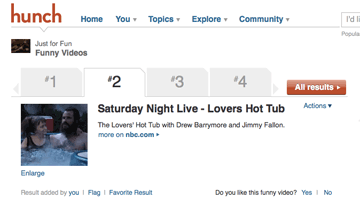
A page that uses tab links near the top. This is used on the current result page design on Hunch:
A picture slide show. Time’s “Pictures of the week”, could benefit from this:

I saw a similar slide show use a hash on the navigation links (e.g. a url like "page123.html#slideshow"). This is a simpler solution to this problem, which is nice, because it’s a lot less work, but it’s not as fluid as remembering the exact same scroll position as the prior page.
Caveats:
Images that affect the height of a page should be given height and width dimensions, otherwise they might screw up the scrolling on page loads before the images have loaded.
If your pages do progressive rendering via multiple flushes (common with php), then there may be a slight delay between a new page appearing and the scroll happening—depending on when you flush and how your HTML/CSS/Javascript is setup.
That’s Scroll Sneak… enjoy!
* Naming:
One might try to call this Scrolljax, but if I wanted to get technical with that one—AJAX is “Asynchronous JAvascript and Xml”, so this would have to be SCROLLJAWN “SCROLLing with JAvascript using Window.Name”.
I asked for some name ideas at Hunch and Tom suggested J-stash (uses javascript to stash the scroll location)—the name seemed like a little too broad for this idea, but lots of potential for a graphic…

Kudos to gleitz for suggesting something related to Homestar runner’s “the sneak”.

Comments (36)
1. Matt Gattis wrote:
This is the way to go if you want a dynamic-feeling page but you care about SEO, folks. I'm disappointed Peter didn't go with J-stash though.
Posted on 8 March 2010 at 4:03 PM | permalink
2. Matthew Gattis wrote:
Though don't go crazy with this... I wouldn't want my scroll position maintained in a lot of cases like if I'm paginating after a long list of items. In that case you should take me back to the top, don't leave me hangin'.
Posted on 8 March 2010 at 4:03 PM | permalink
3. LG wrote:
That J-stash sure is cute! But the scroll sneak is cuter.
Posted on 8 March 2010 at 6:03 PM | permalink
4. B Taylor wrote:
THANK-YOU!! I am finishing up a job for a client that originally talked about wanting flash. I had everything worked out in non-flash solutions but the page jumping was a deal breaker. It is now 5am after an all-nighter and you have saved me! I'm not a javascript guy so I felt you could be a little more basic in your directions, but after testing a bit I got it worked out and it is awesome.
One thing to consider, I have a display image that gets replaced by other images by clicking an arrow IF there are other images in that series. If not, or if it is the last one, the arrow is not displayed and therefore causes all detection in the script to stop.
I changed document.getElementById('displayprev').onclick = sneaky.sneak; to if (document.getElementById('displayprev')) {document.getElementById('displayprev').onclick = sneaky.sneak;}
and that covered situations where that element might not be detected for whatever reason. Now it works like a champ.
thanks again!
Posted on 23 March 2011 at 5:03 AM | permalink
5. B Taylor wrote:
BTW. I like sneaky.sneak for a name. That is, after all, what you tell it to do for each link that should preserve scroll position. I would do it all lowers and keep the dot.
Posted on 23 March 2011 at 5:03 AM | permalink
6. peter wrote:
I’m glad it helped you out B Taylor, and nice work solving that problem for your project!
Posted on 23 March 2011 at 11:03 AM | permalink
7. mgudesblat wrote:
Hi there! this was just what i was looking for, only problem is, i dont seem to be able to implement this on my site. ( ourithelpcom.ipower.com) i downloaded the source, and i stuck it into loaded scripts on my page. i jus dont know how to make it work. Im also looking at btaylor's post, and wondering where exactly that snippet of code is. if you have any help, id greatly appreciate it.
Posted on 31 March 2011 at 6:03 PM | permalink
8. peter wrote:
Hey, your scroll-sneak.js file is very different than the code from my site, if you’re having trouble figuring it out, I’d recommend not changing it too much. Look at the source for the demo page: http://mrcoles.com/scroll-sneak/ it uses the scroll-sneak.js file, and then at the bottom of the file there’s another javascript snippet with the comment "SCROLL SNEAK JS". You need to include that part too and set the click handlers for the links which should remember the scroll position.
Posted on 31 March 2011 at 10:03 PM | permalink
9. Vin wrote:
Hi Peter, this is awesome mate! Only problem is that it doesn't seem to work on the Wordpress site I'm designing...
The target links are in 'div.nav ul li a' and so my code in the header.php include is:
<script> (function() { var sneaky = new ScrollSneak('capsoc'), tabs = document.getElementByClass('nav').getElementByTagName('ul').getElementsByTagName('li'), i = 0, len = tabs.length; for (; i < len; i++) { tabs[i].onclick = sneaky.sneak; }; })(); </script>
and the scroll-sneak.js file is linked in the <head> section. It just won't work. I'd really appreciate some help.
Thanks!
Posted on 17 May 2011 at 6:05 AM | permalink
10. peter wrote:
Hey Vin, if you want to run it in the <head>, then you need to attach that function to some sort of load event. This is because pages load sequentially, scripts are executed immediately, and a script in the head will be run before the HTML below it has loaded. If you’re using jQuery, you can use their document ready function, which executes once all the HTML of the page has been read—then you could write something like this:
<script> $(function() { var sneaky = new ScrollSneak('capsoc'), tabs = $('.nav ul li').click(sneaky.sneak); }); </script>
(Note:
$(function() {...})is the same as$(document).ready(function(){...}))You could also try something like
window.onload = function() { ... };, but that won’t get executed until all images have finished downloading.Posted on 17 May 2011 at 11:05 AM | permalink
11. Vin wrote:
Peter you're a legend mate. You've just pushed my understanding a huge step forward. Thanks a million! It's people like you who've made me so passionate about becoming a designer. Keep up the great work!
Posted on 18 May 2011 at 4:05 AM | permalink
12. peter wrote:
Np, Vin. I’m glad I could help! Keep on learning :)
Posted on 18 May 2011 at 11:05 AM | permalink
13. Kory wrote:
Many, many thanks for this script! Had to read through the comments to learn how to get it working with Wordpress, but it works like a charm now. And as a side note, I appreciate the 'Sneak' references (I myself have a cat that I named The Sneak).
Posted on 18 September 2011 at 12:09 AM | permalink
14. Steve B. wrote:
Hi Peter, I would like to start by saying this is brilliant.
However, I can't get it working for my site. I have 2 separate js files included on my page. First I am including the scroll-sneak.js file and later a js file with the script code found on the page in the demo. For some reason I keep getting an error in firebug stating that: "document.getElementById("sort-tabs").getElementsByTagName("li").getElementsByTagName is not a function"
That line of code in the js file looks like this: var sneaky = new ScrollSneak('mySite'), tabs = document.getElementById('sort-tabs').getElementsByTagName('li').getElementsByTagName('a'), i = 0, len = tabs.length;
As you can see i modified it slightly to suit my needs.
Any clue as to why I am receiving this error?
Thanks a ton in advance!!!
Posted on 3 October 2011 at 12:10 PM | permalink
15. Steve B. wrote:
I figured out my error. It was due to lack of js knowledge. I was using getElementsByTagName as if it were jquery. Sorry. You can delete my comment if you'd like.
Thanks!
Posted on 3 October 2011 at 1:10 PM | permalink
16. Mark S. wrote:
Hi Peter!
It's working perfectly on your demo page, so I don't understand what I missed! I just need to add <script src="js/scroll-sneak.js"></script> in the head and the small javascript part before </body> right? Thanks for you help! Mark
Posted on 10 December 2011 at 4:12 PM | permalink
17. Mark S. wrote:
... I know what I missed! My menu part looks like this:
what do I need to change here to make your javascript to work? Thanks for your help! Mark
Posted on 10 December 2011 at 5:12 PM | permalink
18. Leila Hadžić wrote:
Hi, I used your great script for a page in the application I am working on. But, as I am not so good in JS, I can't seem to make it work for a button. Let me explain: When I just submit the page , for example pressing the button F5, it works. But, when I am pressing the button Save (which calls a function:uradi_submit('SAVE');) it doesn't work.
function uradi_submit(req) { needToConfirm = false; apex.submit(req);
}
Please could you explain how can this be done.
Regards, Leila
Posted on 31 January 2012 at 7:01 AM | permalink
19. peter wrote:
Hi Leila, I’m not sure what you’re trying to do or how it’s related to the details of this post. Maybe you can try posting some more information on a site like stackoverflow.com ?
Posted on 6 February 2012 at 10:02 AM | permalink
20. Gabriele wrote:
Hi Peter, thank you for this post and for sharing this script. I noticed that in chrome, safari and ie, changing tab, the page goes up for a split second while on firefox not, is there any solution to this?
Regards Gabriele
Posted on 11 March 2012 at 1:03 PM | permalink
21. hekla wrote:
Thank you for this wonderful script, the effect is excellent!
I try to use the effect it on three different menus on a page, but the problem is, that I cannot use the same id tag more than once in the code, since they have to be unique to be valid HTML code.
I used now in the HTML: <div class="menu" name="navigation"> and in the JS: tabs = document.getElementsByName('navigation'), i = 0, len = tabs.length;
but is no attribute "name" allowed in the div tag either ...
I have only few knowlegde in JS, but if you find the time to give me a hint, how I can use the script on more than one ids the page, I would be very happy.
Greetings, hekla
Posted on 28 March 2012 at 5:03 AM | permalink
22. Hugo wrote:
It works just fine, thanks a lot for this post. I managed to make it work on two different lists on the same page (see URL) in defining to different "ul" ids and writing two times the javascript snippet "SCROLL SNEAK JS" at the bottomof the page, one with the first ul id and the other with the second ul id, each with a different string name. How could the snippet be changed to care about sevreal lists on the same page in a more elegant way?
Posted on 27 April 2012 at 1:04 PM | permalink
23. peter wrote:
@Gabriele — It should be quick in most every browser. I guess it also depends on where the ScrollSneak code gets executed, if you have it waiting on a load event, and if more content on the page is loading after the initial page load.
@hekia — you’re misinterpreting how to use DOM functionality. I’d recommend reading up on some basic tutorials and also checking out jQuery. Your particular problem would probably be solved in jQuery as
$('.menu a').click(sneaky.sneak);@hugo — I’m assigning the function to multiple things in my own sample code: view-source:http://mrcoles.com/scroll-sneak/ — probably the most elegant way to do it (if you’re using jQuery) is to just select everything you need and attach
sneaky.sneakas a click handler (see the above paragraph for an example).Posted on 2 May 2012 at 2:05 AM | permalink
24. howie wrote:
Can anyone give me a hint why my implementation of the code works on IE 8, and IE 9 but not IE 7. I noticed Mr Coles demo DOES work on IE 7 - so I am thinking it must be my implementation isn't quite right.
Posted on 12 June 2012 at 9:06 AM | permalink
25. Howie wrote:
OK the code workds fine under IE 7 (under most conditions).
For me it stopped working ONLY under IE 7 and only if the control I was attaching the "sneaky" to was inside a an ASP.table.cell (see example below)
example: where the sneaky wouldn't work in IE7
<asp:Table ID="treetable" BackColor="#F9F9F9" runat="server"> <asp:TableRow> <asp:TableCell HorizontalAlign="Left" VerticalAlign="Top" CssClass="blue12"> <asp:ImageButton ID="ImageButtonAddToOrder" CommandName="addtoorder" OnClientClick="sneaky.sneak()" ImageUrl="~/images/addtocart.gif" runat="server" /> <script type="text/javascript"> var sneaky = new ScrollSneak(location.hostname);</script> </asp:TableCell> </asp:TableRow> </asp:Table>
Good news is that I found the problem and a code-fix that makes it work.
Under the above conditions (IE7 and a table-cell) the Window.ScrollTo code would not work in the Sneaky.Scroll function.
Below is the (before and after code) - the after code works in my application for (IE-7-8-9) (ff) (chrome) and Safari 5.1.5 (7534.55.3)
The fix was to encapsulate the windows.scroll to in a Timeout Function -- Found this workaround elsewhere on the net - Bless the person that posted it.
Before (Peter-Coles) Vanilla Code:
this.scroll = function() { if (window.name.search('^' + prefix + '(\d+)(\d+)') == 0) { var name = window.name.split(''); window.scrollTo(name[1], name[2]) ; window.name = name.slice(3).join('_'); } }
AFTER (Howie's Minor Tweak):
this.scroll = function() { if (window.name.search('^' + prefix + '(\d+)(\d+)') == 0) { var name = window.name.split(''); setTimeout(function() { window.scrollTo(name[1], name[2]) }, 1); window.name = name.slice(3).join('_'); } }
Sincerely hope that helps somone.
Posted on 13 June 2012 at 9:06 AM | permalink
26. Marco wrote:
Hi Peter,
You script looks great. I was trying to adapt it to my website, but what if instead of a menu, I have different buttons or a menu that looks like this:
<div id="tabs"> <a href="1.htm" id="tab1" class="sneak"> <span>1</span></a> <a href="2.htm" id="tab2" class="sneak"> <span>2</span></a> </div>
On your code you have this line:
tabs = document.getElementById('tabs').getElementsByTagName('li');
On buttons or in a simple menu like the one I put the code there is no element <li> so how can you adapt to keep using the same javascript?
Thanks! Marco
Posted on 23 July 2012 at 5:07 AM | permalink
27. Marco wrote:
Got it!! I used <a> tags insted of <li> and it worked =)
tabs = document.getElementById('tabs').getElementsByTagName('a');
Posted on 23 July 2012 at 7:07 AM | permalink
28. Sully wrote:
How the hell do i get this to work! It works on the demo on your site but not in my site. I have included the scroll-sneak.js at the top and I put the SCROLL SNEAK JS just above the </body> tag at the bottom and it is still not working! I have not changed any of your code at all! Please help!
Posted on 23 July 2012 at 2:07 PM | permalink
29. peter wrote:
Hi Sully, no need to yell. It’s hard for me to know what’s going on with your code when I can’t see it. If I were to guess what is wrong, I’d assume that you haven’t set up the "sneak" event handler to run when you click on whatever links you want to maintain scroll position.
In my demo, this code applies the "sneak" event handler to all "li" elements underneath the element with the id "tabs" and also to the element with id "next":
Maybe in your demo, you want to apply it to something different. For example, in Marco's example above, he changed the code to work for links (a tags) underneath the div with id "tags".
If you're using jQuery, you can more simply just select whatever you'd like the scroll sneak code to work for and then attach the sneak event to that. For example, if it were links with the class of "tab", you'd do something like:
That’s about all the info I can give you.
Posted on 23 July 2012 at 6:07 PM | permalink
30. Sully wrote:
I am very sorry for yelling it's just I have been working on this site for a while and this one thing has been bugging me for ages but now THANKS TO YOU I HAVE IT WORKING! Thank you for getting back so quick. I was just being stupid and didn't even know you had to add in any of the things you mentioned in your reply. So I finally have it working and all I can do is thank you!
Posted on 23 July 2012 at 7:07 PM | permalink
31. peter wrote:
I'm glad you got it working :)
Posted on 23 July 2012 at 9:07 PM | permalink
32. Marleena Pontynen wrote:
Thank you! I have practically no knowledge on java script and how exactly it works, but I managed to implement your program onthe gallery pages I am working on. Thank you for sharing!
Posted on 11 September 2012 at 5:09 AM | permalink
33. Neen wrote:
Hi Peter,
I've followed the instructions and put scroll-sneak.js in the <head> and I've also put the SCROLL SNEAK JS script above the </body> but for some reason it's not working. I've changed the code to my links, but I must be missing something... Here it is:
<!-- SCROLL SNEAK JS: you can change
location.hostnameto any unique string or leave it as is --> <script> (function() { var sneaky = new ScrollSneak(location.hostname), tabs = document.getElementById('tabs').getElementsByTagName('a'), i = 0, len = tabs.length; for (; i < len; i++) { tabs['.cat-links a'].onclick = sneaky.sneak; } document.getElementById('prev').onclick = sneaky.sneak;})(); </script> <!-- END OF SCROLL SNEAK JS -->
Posted on 14 September 2012 at 5:09 PM | permalink
34. Neen wrote:
I'm pretty sure tabs['.cat-links a'].onclick = sneaky.sneak; } isn't meant to be like that... I'm meant to leave it as [i] right? Still doesn't work though. Hmm...
Posted on 14 September 2012 at 6:09 PM | permalink
35. Neen wrote:
Sorted it now! :)
Posted on 14 September 2012 at 6:09 PM | permalink
36. peter wrote:
Hey Neen, I'm glad you sorted it out—sorry for not getting there sooner :)
Posted on 17 September 2012 at 11:09 PM | permalink